

Query Optimization
Keep your query under 1500 characters
Keep queries concise—under 1500 characters. Think of it as a query for an agent performing web search, not long-form prompts.Break complex queries into sub-queries
For complex or multi-topic queries, send separate focused requests:Search Depth
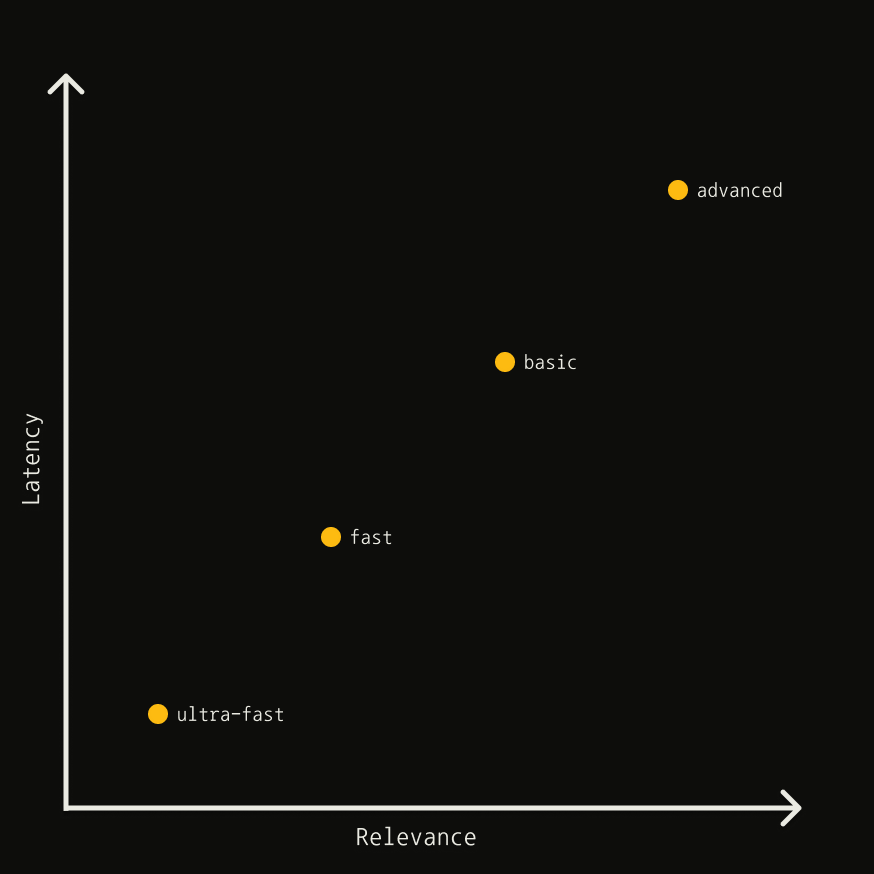
Thesearch_depth parameter controls the tradeoff between latency and relevance:
Show Latency vs relevance chart
Show Latency vs relevance chart
Content types
Use chunks when you need highly targeted information aligned with your query. Use content when a general page summary is sufficient.
basic vs advanced
advanced searches more broadly and reaches more sources per query, delivering the highest
relevance at higher latency. Reach for it when coverage matters most: niche topics, very
recently published pages, or questions with several distinct facets.
Longer, more detailed queries also do better with advanced — the extra context gives it
more to match against, whereas basic is tuned for short, focused lookups.
basic covers less ground for a lower latency budget, making it the right default for
general-purpose lookups where a fast, query-aligned answer is enough.
Both depths return chunks, and chunks_per_source controls how many come back per source
at either depth.
basic previously returned a single page summary per source. It now returns reranked
chunks. See the changelog entry for details.Fast + Ultra-Fast
Using search_depth=advanced
Best for queries seeking specific information:
Filtering Results
By date
By topic
Usetopic to filter by content type. Set to news for news sources (includes published_date metadata):
By domain
Keep domain lists short and relevant for best results.
include_domains_mode: "prefer" is useful when you want to prioritize trusted sources without risking empty results if none of them cover the query.By language
filter_by_language can return fewer results — or none — when few sources match the requested language. Use it only when a mismatched-language result would be worse than no result; otherwise rely on language alone for a soft boost.Response Content
max_results
Limits results returned (default: 5). Setting too high may return lower-quality results.
include_raw_content
Returns full extracted page content. For comprehensive extraction, consider a two-step process:
- Search to retrieve relevant URLs
- Use Extract API to get content
auto_parameters
Tavily automatically configures parameters based on query intent. Your explicit values override automatic ones.
auto_parameters may set search_depth to advanced (2 credits). Set it
manually to control cost.Exact Match
Useexact_match only when searching for a specific name or phrase that must appear verbatim in the source content. Wrap the phrase in quotes within your query:
- Due diligence — finding information on a specific person or entity
- Data enrichment — retrieving details about a known company or individual
- Legal/compliance — locating exact names or phrases in public records
Async & Batch Search
Use async calls for concurrent requests:Parallelize with bounded concurrency
For larger batches, cap in-flight requests to stay under your rate limit, and tag each result so one failure (e.g. a429) doesn’t sink the whole batch.
concurrency ≈ (RPM / 60) × avg_latency_s. For example, at 100 RPM and 3s avg latency that’s (100 / 60) × 3 ≈ 5. Start there and tune up while watching your 429 rate.
Deduplication
Dedupe the results to save tokens and avoid repetitive context — join uniquecontent chunks with Tavily’s [...] separator.
Operational checklist
- Run queries in parallel, but cap how many run at once with a semaphore so you stay under your rate limit.
- Handle failures per query. Tag each result
ok/errorand retry only the failed ones with backoff, so a single error never sinks the whole batch. - Consolidate results. Dedupe URLs and combine their unique content so you don’t pay to process the same page twice.
- Track credits. Pass
include_usage=Trueand sum theusagefrom each response to see total credits spent across the batch. - Set a timeout. Cap each search (e.g.
timeout=10) so one slow query doesn’t stall the batch.
Post-Processing
Using metadata
Leverage response metadata to refine results:Score-based filtering
Thescore indicates relevance between query and content. Higher is better, but the ideal threshold depends on your use case.
Regex extraction
Extract structured data fromraw_content:
Use Session Tracking for Multi-Step Workflows
When an agent issues several Tavily calls to answer a single user task — for example, retrieving sources, then extracting full content from a subset, then running follow-up searches — pass a consistentsession_id across all related calls.
If your agent serves multiple end-users behind a single API key, also pass a stable human_id per user. For security, Tavily hashes human IDs before processing or storing them.
See the SDK references or the API HTTP headers for how to set these.